· 9 min read
Getting started with OpenQARP
From pip install to a working two-qubit experiment: build a Bell state, sample it, measure an observable, and see where blocks, primitives and engines fit. Every output in this post comes from a run of the released package.
All you need is Python, OpenQARP and a laptop. You do not need a quantum computer: a simulator runs everything in this post, and it is how most quantum application research gets done.
OpenQARP splits a quantum program into three parts: the circuit, the quantity you want from it, and the machine that runs it. This post builds one of the simplest programs there is, a Bell state on two qubits, and uses it to show each part in turn. By the end you will have prepared the state, sampled it, measured an observable on it, and seen which part of the program to change when you want something else. Every output shown here comes from running the code exactly as printed, on OpenQARP 0.1.1.
Install it #
pip install openqarp
The package installs as openqarp and imports as qarp. It supports
Python 3.11 to 3.14, and wheels ship for Linux (x86_64 and arm64), macOS
(Apple silicon and Intel) and Windows, with the compiled core included.
Anywhere else pip builds the C++ core from source, which takes a few
minutes and a compiler. Use a fresh virtual environment for your
experiments, and see the
installation guide
for GPU support and build options.
Check that it imports:
import qarp
qarp.__version__
'0.1.1'
Three layers #
OpenQARP organises a program into three layers, and you change one without touching the other two.
- Blocks describe the circuit: gates, state preparations, measurements.
- Primitives describe what you want out of it: samples, an expectation value, an overlap, a phase.
- Engines describe how it runs: an exact state vector on your CPU, a device model with noise, a GPU.
In this post the block is a SimpleBlock, the primitive is a Sampler
and the engine is a QarpEngine.
What is OpenQARP has more on why the framework
is organised this way.
Build a Bell state #
Run this in a notebook, so the last line can draw:
from qarp.blocks import SimpleBlock

bell = SimpleBlock(2, name="bell")
bell.h(0)
bell.cx(0, 1)
bell.measure([(q, q) for q in range(2)])
bell.build()
bell.plot()
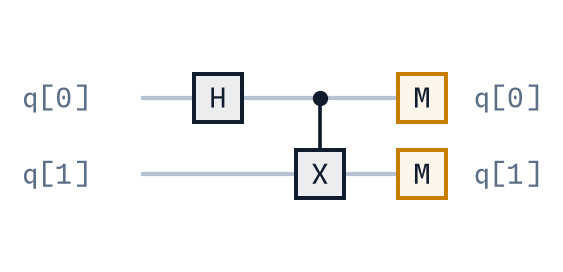
SimpleBlock(2, name="bell")is a circuit on two qubits, both starting in zero.h(0)puts qubit 0 in an equal superposition of zero and one.cx(0, 1)flips qubit 1 when qubit 0 is one. After the Hadamard that entangles the pair: the two qubits no longer have separate states.measuretakes pairs of (qubit, classical bit). Here qubitqis read into bitq.build()assembles the circuit in the C++ core. A block is a plan until you build it.plot()draws the diagram above.
Sample it #
A primitive says what you want to calculate. Sampler asks for the
distribution of measured bitstrings. An engine runs the computation.
from qarp.algorithms import Sampler
from qarp.engines import QarpEngine

sampler = Sampler(ket=bell, n_shots=4000)
engine = QarpEngine(seed=42)
engine.build([sampler])
distribution = engine.run()[0]
print(distribution)
{(0, 0): 0.48875, (1, 1): 0.51125}
Sampler(ket=bell, n_shots=4000)asks for 4,000 repetitions, or shots, of the circuit. It says nothing about how to get them.QarpEngine(seed=42)is the CPU simulator. The seed fixes the random stream, so the same program gives the same numbers on every run.engine.buildtakes a list of primitives, so one engine can serve several at once, andengine.run()returns one result per primitive.[0]picks the first.
Read the result #
The keys are tuples of bits indexed by qubit: position 0 is qubit 0, position 1 is qubit 1. OpenQARP puts the least significant bit first everywhere, and this is the first place you meet that convention. The values are probabilities, not counts. Multiply by the shot count if you want counts: 1,955 and 2,045 here.
For an ideal Bell state the probabilities are one half for 00 and one
half for 11, and zero for 01 and 10. The run never produced a
mismatched pair. The distance from one half is due to shot noise: 4,000
coin flips are unlikely to produce exactly 2,000 heads. A different seed
gives a different split from the same circuit:
{(0, 0): 0.49025, (1, 1): 0.50975}
One caution. Two qubits that always agree is what a Bell state does, but a pair of classical coins glued face to face would give the same table. The observable section below measures the same state in a second basis, which a classical pair cannot pass.
Change one thing #
Change one line, rerun the whole example so the block and the engine are
rebuilt, and compare. Here is what each change produces with seed=42.
Remove bell.h(0). Both qubits start in zero, so the CX has nothing
to flip and every shot reads 00:
{(0, 0): 1.0}
Restore the Hadamard and remove bell.cx(0, 1). Qubit 0 is random and
qubit 1 stays zero. The qubits are no longer entangled, so the outcomes
are 00 and 10, with 10 meaning qubit 0 is one and qubit 1 is zero.
Read the tuple by position, not as a binary number:
{(0, 0): 0.48875, (1, 0): 0.51125}
The split is the same as before because the seed is the same. Only the labels moved.
Restore both gates and change the shot count. With 100 shots and then 10,000:
{(0, 0): 0.51, (1, 1): 0.49}
{(0, 0): 0.4947, (1, 1): 0.5053}
The statistical error on a probability near one half shrinks as one over
the square root of the shots: about 0.05 at 100 shots, 0.008 at 4,000
and 0.005 at 10,000. More shots narrow the spread of possible results.
Any one run still lands where it lands, and with seed=7 the 100-shot
version gives 0.55 and 0.45.
Measure an observable #
To get an expectation value instead of samples you change the primitive. The circuit no longer includes measurements, because an expectation value is a property of the quantum state. The primitives add whatever measurements are needed. The observable here is a sum of two Pauli strings, Z on both qubits plus half of X on both qubits.
from qarp.operators import QubitOperator
from qarp.algorithms import PauliAveraging, StateVector

circuit = SimpleBlock(2, name="bell")
circuit.h(0)
circuit.cx(0, 1)
circuit.build()

H = QubitOperator("Z0 Z1") + 0.5 * QubitOperator("X0 X1")
exact = StateVector(ket=circuit, operator=H)
shots = PauliAveraging(ket=circuit, operator=H, n_shots=4000)

engine = QarpEngine(seed=42)
engine.build([exact, shots])
results = engine.run()
print(results[0], results[1])
(1.4999999999999998+0j) 1.5
StateVectorcomputes the expectation value exactly from the simulated state. It comes back as a complex number with a zero imaginary part.PauliAveragingestimates the same value from 4,000 shots, measuring each Pauli string in its own basis.
Check it by hand before trusting it. The Bell state is an eigenstate of Z on both qubits with eigenvalue one, and of X on both qubits with eigenvalue one, so the expectation value is one plus a half. The sampled estimate is exactly 1.5 rather than close to it because every shot of an eigenstate returns the same eigenvalue; there is nothing to fluctuate. The agreement in the X basis is the test a pair of classical coins fails.
That is the habit worth keeping. Before you run a circuit whose answer you cannot predict, run one whose answer you can.
Build on it #
Change the engine, keep the rest. Give QarpEngine a device
description and it compiles the circuit to that device’s gate set and
layout and adds its noise. CudaqEngine runs on GPUs through CUDA-Q and
needs a build with CUDA-Q support. The block and the primitive do not
change. Noisy results depend on the noise model you chose, and a GPU
helps on large workloads, not on two qubits.
Reuse blocks. Blocks nest, so a state preparation you wrote once can sit inside a larger circuit, or stay fixed while you compare several observables against it.
Record what you ran. Keep the circuit parameters, the shot count, the seed and the package version next to the results. Two runs are only comparable when all four are known.
Scale up from a case you can predict. The Bell state is that case: you know the ideal distribution, you can explain each gate, and you can tell shot noise from a change in the circuit. Grow the circuit from there.
Pick an algorithm by problem #
Every algorithm in the library has a runnable notebook in the examples directory. Choose by the question you want to ask.
- Chemistry and quantum simulation. The Variational Quantum Eigensolver (VQE) and Quantum Imaginary Time Evolution (QITE) find low-energy states. Variational Fast Forwarding (VFF) approximates time evolution.
- Optimisation. The Quantum Approximate Optimisation Algorithm (QAOA) is the starting point for combinatorial problems, with the problem given as a graph.
- Estimation and number theory. Quantum Phase Estimation (QPE), amplitude estimation and Shor’s algorithm cover phase extraction, probability estimation and factoring.
The use_cases folder has four worked problems from outside quantum
computing: a DNA search, a molecular torsion scan, a portfolio
diversification problem and an image classifier. In each notebook, find
the block, the primitive and the engine, change one parameter, and only
then bring your own problem.
Work with a coding agent #
If you write code with an agent, give it the repository and ask it to read AGENTS.md first, then the conventions document, which fixes qubit ordering, rotation angles and phases. Tell it which release you are on.
A prompt that works:
Read OpenQARP’s AGENTS.md and its conventions document, then adapt the Bell-state example to compare shot counts. Explain your plan, keep the circuit as it is, run the example and check the results against the theoretical probabilities. Report what you ran and any limitations.
Review the code and the numbers yourself. An agent can write a plausible program in a minute, but an incorrect result can look just as convincing as a correct one. The project holds its own code to the rule that every numerical result is checked against an independent reference, and that rule applies just as well to the code an agent writes for you.
That is the whole loop: build a block, give a primitive the quantity you want, run both on an engine, and check the number against one you can predict. The larger algorithms in the library follow the same loop with bigger blocks.
Where next #
- The six tutorial notebooks,
tutorial_00totutorial_05in the examples directory, take about an hour end to end, and the OpenQARP Tutorial is the same path in the documentation. - The documentation has the API reference, and the benchmark harness has the method behind every published timing.
- Questions go to GitHub Discussions, and the paper has the design in full.
- Why we built OpenQARP is an interview with two of the people behind the project.